Phone (RJ11)
The AW1000 RJ11 phone port works on NoobWRT with noobwrt-aw1000-voice, which carries the phone driver and service from openwrt-aw1000-phone, the SIP server from openwrt-modem-sip and its own management interface. Plug in a normal desk phone and make and take calls with the SIM in the 5G modem (VoLTE), or use SIP phones and apps on your network.
Features
- Incoming and outgoing calls, dial tone, ringing tone and busy tone
- HD calling (16 kHz wideband audio), switched on in Settings
- Caller ID on phones with a display (FSK Bellcore, FSK ETSI or DTMF, before or after the first ring)
- Hold with the FLASH button, speed dial, a phonebook and blocked numbers
- Ring patterns: standard, short, double (UK and Australia) or custom
- The phone LED follows the line: ready, ringing and off hook
- Do not disturb windows, holidays, alarm calls, call recording and MQTT
- SIP phones and apps on the LAN share the SIM with the RJ11 phone (Modem SIP)
- A management interface on its own port: missed calls, call history with CSV export, an SMS inbox, recordings, every setting, line health, and push alerts for missed calls and new SMS (ntfy, Telegram or a webhook)
- SMS over SIP: new SMS arrive in the chat of the SIP phones and apps, and a chat reply goes out as an SMS
Tested with ModemManager only
The phone stack is tested on NoobWRT with ModemManager driving the modem. It is not tested with QModem. SMS (inbox, alerts, SMS over SIP) needs ModemManager.
Requirements
- AW1000 with the Quectel RG500Q-EA modem
- A NoobWRT
rj11firmware image from Releases - A SIM with voice calls (VoLTE)
- The SLIC DSP patch file (see below)
Packages
The rj11 images include the phone packages: kmod-aw1000-fxs, fxsd, modem-sip,
aw1000-voice-web and luci-app-aw1000-voice. Check that they are installed:
apk list --installed | grep -E 'fxs|modem-sip|aw1000-voice'
The kernel module must match the firmware's kernel, so install these packages from the same
NoobWRT build as the firmware. They replace the older luci-app-fxs and luci-app-modem-sip.
The Management Interface
Open it from LuCI under Services then Phone with Open management interface, or go
straight to http://192.168.1.1:7766/. Sign in with the same user name and password as LuCI.
It answers on the LAN address only.
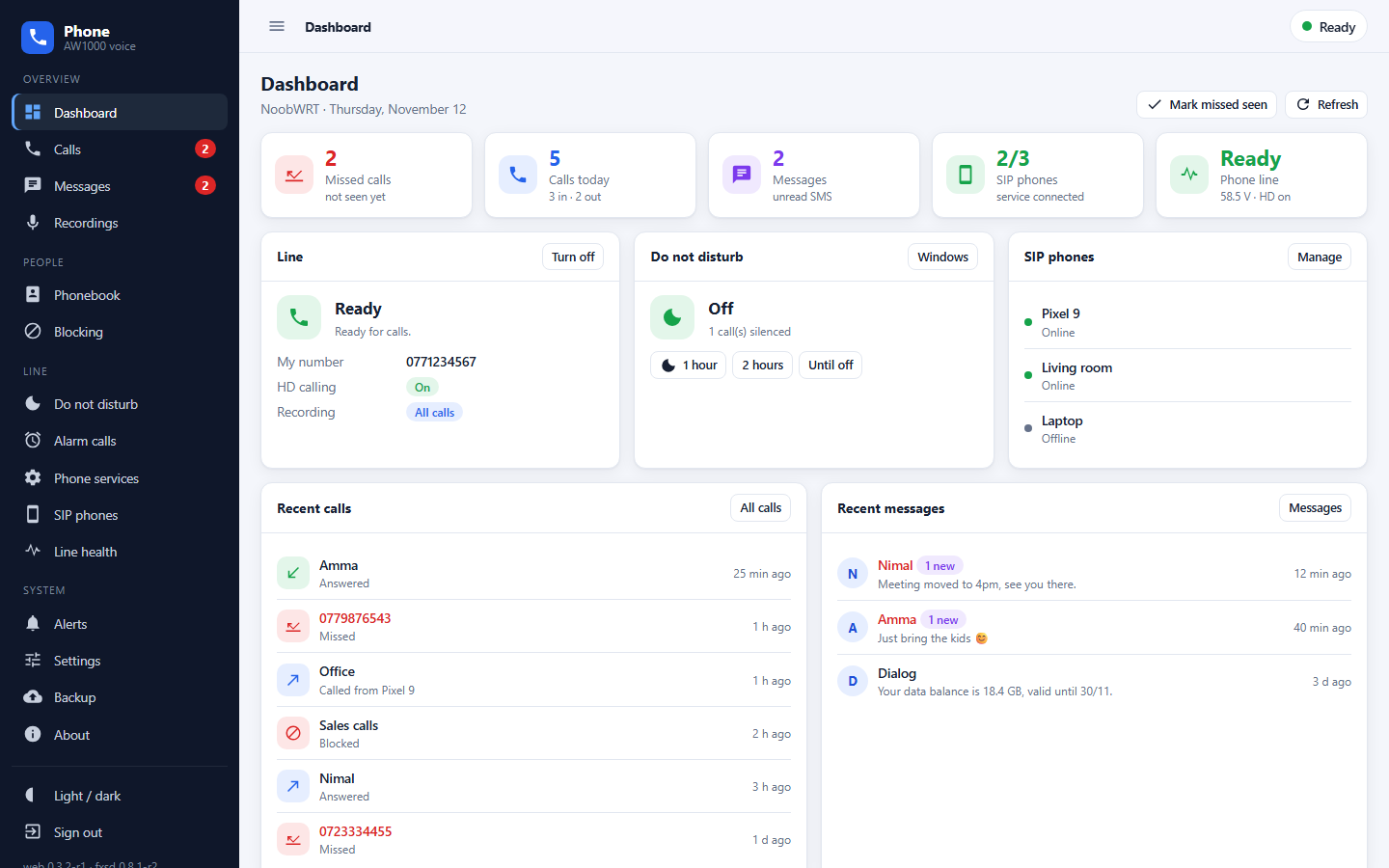
On a phone, use the browser's Add to Home screen to open it like an app.
SLIC Patch File
The phone chip (Skyworks Si3226x) needs a DSP patch file every time it starts. This file belongs to Skyworks and is not open source, so it cannot be included in NoobWRT images.
See the SLIC patch file section of openwrt-aw1000-phone for how to create it, then copy it to the router:
scp si3226x_patch.bin [email protected]:/etc/fxs/si3226x_patch.bin
Turn On the Phone Port
Turn the port on from the management interface (Dashboard, Turn on), or run:
uci set fxs.main.enabled=1
uci commit fxs
/etc/init.d/fxsd enable
/etc/init.d/fxsd restart
Missed-Call Alerts
In the management interface open Alerts, pick ntfy, a Telegram bot or a webhook, choose
the events (missed calls by default) and press Send a test. The alert carries the caller's
name from the phonebook. If you already use /etc/fxs/hook.sh for your own script, it is
left alone; call /usr/libexec/aw1000-voice-notify "$1" "$2" from it to keep both.
SMS
The Messages page shows the SMS on the SIM as conversations, with names from the phonebook. Reply to a conversation or press New message to send an SMS.
With Send SMS to SIP phones on (the default), every new SMS also arrives in the chat of the SIP phones and apps, from the sender's number. Answer in that chat and the reply is sent as an SMS. A phone that is away gets the message when it logs in again. Senders with a name instead of a number, like a carrier, cannot be answered.
Turn on New SMS on the Alerts page to also get each SMS, with its text, as a push alert.
Modem Slave Mode
The modem audio interface must be in slave mode. From release v2026-10-30 this is automatic: the phone service checks it every time it starts and sets it if needed. The first time, it restarts the modem, so the internet drops for about a minute, once. The modem remembers the setting. It also finds the modem AT port by itself, so nothing needs to be set up.
If the phone does not ring, or Line health shows a problem with the modem audio, set it by hand:
mmcli -m any --command='AT+QDAI=x,1,0,4,0,0,1,1'
mmcli -m any --command='AT+CFUN=1,1'
The second command restarts the modem. The modem remembers the setting after that.
To go back to the factory setting, run AT+QDAI=x,0,0,4,0,0,1,1 the same way, then restart the modem again with AT+CFUN=1,1.
ModemManager must allow AT commands over D-Bus for these commands; NoobWRT builds
it with that option enabled. If mmcli --command is unavailable, the phone
service still talks to the modem directly on its AT port.
Older releases
On v2026-10-24 and older images the phone service may not set slave mode by itself. Run the commands above once, or upgrade to the latest release.
No Sound From the Modem
If a call connects but neither side hears the other, Line health says so. A board whose modem sits on other PCM slots can be corrected without a rebuild:
uci set fxs.main.modem_slots='1,0'   # bridge rx,tx slot
uci set fxs.main.qdai_slot='1'       # AT+QDAI slot
uci commit fxs && /etc/init.d/fxsd restart
Settings
All settings are in the management interface: Settings, Phonebook, Blocking, Do not disturb,
Alarm calls, Phone services, SIP phones and Recordings. They are stored in /etc/config/fxs,
/etc/config/modem_sip and /etc/config/aw1000_voice.
Troubleshooting
- Logs:
logread -e fxsd, or Line health in the management interface - Call log:
/etc/fxs/calls.log - Calls fail straight away: the modem may have voice calls blocked by
call_control. Check the problems section of openwrt-aw1000-phone. - VoLTE never registers: some units have
sms_onlyset in the modem. See the same problems section. - fxsd does not start after a reboot during startup: run
/etc/init.d/fxsd clear_guardor press Clear start guard in Line health. - The management interface does not open: it listens on the LAN address only; check
uci show uhttpd.phoneand run/usr/libexec/aw1000-voice-web-setup.